Open-source backend-as-a-service for Postgres — REST, typed SDK, auth, storage, realtime and row-level security over your own database, with a schema-driven admin panel when you want one.
Install
npx -y @rebasepro/mcpREBASE_PROJECT_DIRoptional — Project root — the directory holding rebase.json. Defaults to the working directory.REBASE_BASE_URLoptional — Backend URL, used when no local dev server is discovered.REBASE_API_TOKENoptional · secret — API token for the target project. Not needed against a local dev server.REBASE_MCP_ALLOW_REMOTE_WRITESoptional — Allow destructive tools to run against a non-local target. Off by default.

Rebase
The Open-Source Backend-as-a-Service for Postgres — with the Admin Panel that comes with it
Point it at a database and get a working backend in minutes.
REST, auth, storage, realtime and backups over your own Postgres — then add a
schema-driven admin panel, or don't.
Own your data, own your code. The absolute easiest way to build on PostgreSQL.
Public beta. The API you write against can change in a minor,
with a changelog entry. Your data cannot break quietly.
What that promise rests on, and
which subsystems are ready
Live Demo • Documentation • Features • Discord


What is Rebase?
Rebase is a developer-first, open-source backend-as-a-service built on PostgreSQL — authentication, S3-compatible storage, realtime, backups and auto-generated REST APIs over a database you own. It is self-hosted and agent-native, with a built-in MCP server for AI-assisted development.
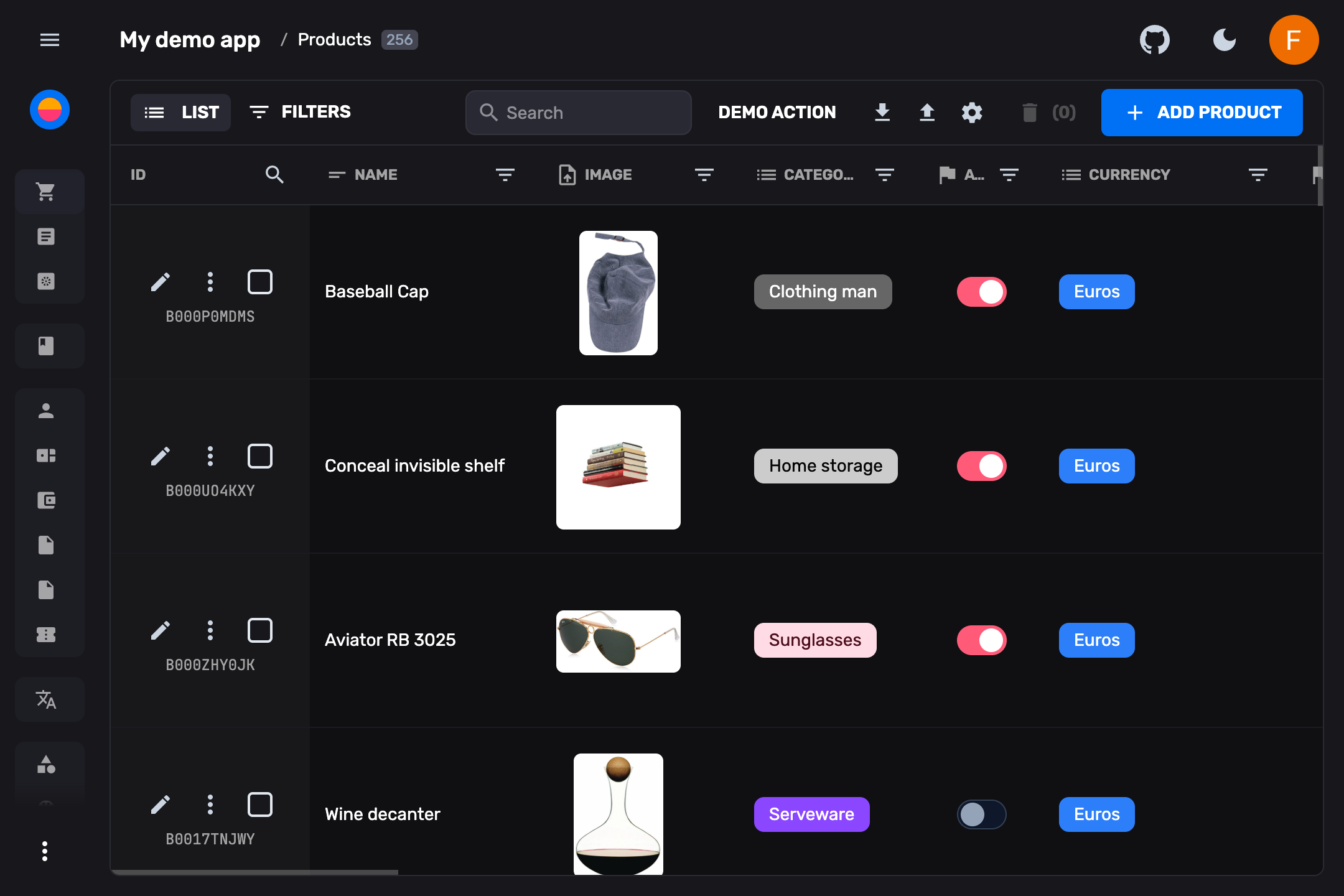
The admin panel is the second layer of the same definition: add collection definitions and you get a schema-driven back-office built from them, extensible with your own React components, serverless functions, and scripts.
Adopt only what you want
Three modes, same packages, wired differently — see MODULAR-ARCHITECTURE.md.
| Mode | You get | Comparable to |
|---|---|---|
| BaaS | REST + auth + storage + realtime + backups over your database. No config files, no UI, no React in the dependency tree. | Supabase |
| CMS | BaaS + a schema-driven admin UI built from your collection definitions. | Payload, Directus |
| Full | CMS + Studio (SQL editor, schema visualizer, RLS editor, logs, API explorer). | Supabase + Payload |
✨ Key Highlights
- 🔓 No Vendor Lock-in — Self-host anywhere. Full control over your infrastructure, code, and database.
- 🧱 Modular — Start as a pure API and add the admin panel later, or never. Nothing is bundled that you didn't ask for.
- ⚡ Instant Setup —
pnpm dlx @rebasepro/cli initscaffolds a complete project in seconds. - 🗄️ PostgreSQL First — First-class Postgres support with Drizzle ORM, schema introspection, and automatic migrations.
- 🔒 Secure by Default — Authorization is Postgres RLS, not application code. Tables without row-level security aren't served.
- 🧩 Radical Extensibility — Not constrained to pre-built widgets. If you can build it in React, you can build it in Rebase.
- 🎨 Premium UI — Fast, accessible design system built on Tailwind CSS v4 and Radix UI.
- 🤖 AI-Ready — MCP server for AI-assisted database management, plus data enhancement and insights plugins.
⚡ Quick Start
Scaffold a complete, self-hosted Rebase application connected to your database:
pnpm dlx @rebasepro/cli init my-rebase-app
cd my-rebase-app
pnpm install
pnpm run dev
That is the whole first run — no database to install, no schema step. With no
DATABASE_URL set, rebase dev starts a managed PostgreSQL (PGlite) that lives
in the project directory, generates the schema from your collections, and creates
the tables at boot.
Read the URLs from its output. rebase dev picks a free port per project
rather than fixed ones, so they differ between projects. PORT and
VITE_API_URL in .env apply to rebase start, not here.
Useful flags: --yes (required when there is no terminal to prompt, such as CI),
--headless (see below), --template <name>, and --install / --no-install
on init; --docker on dev to use the compose Postgres in this project
instead, and --no-db to start nothing — set DATABASE_URL yourself.
To use your own Postgres instead: uncomment DATABASE_URL in .env and run
pnpm run dev again. Nothing else changes — a DATABASE_URL that is set is
never touched, and one pointing anywhere other than this machine is left alone
entirely.
Just want the API?
Rebase is modular — take only the parts you want:
pnpm dlx @rebasepro/cli init my-api --headless
That scaffolds a headless backend: REST, auth, storage, realtime and backups over your database, with no collection files and no UI. Tables are served automatically, derived from your schema at boot — change the schema with a migration and the API follows. No React anywhere in the dependency tree.
A fresh headless project has no tables yet, so /api/data/* answers
404 NO_COLLECTIONS until you create some. Point it at a database that already
has tables, or add them with a migration, and they appear.
The three adoption modes — BaaS (like Supabase), CMS (like Payload/Directus), and both together — are described in MODULAR-ARCHITECTURE.md.
Features
🏓 Full Admin Panel & CMS
An incredibly fast, windowed spreadsheet view to manage your database with inline editing, real-time updates, filtering, sorting, and text search. Switch between multiple view modes:
- Spreadsheet table — Inline editing, column reordering, drag-and-drop
- Card grid — Visual overview with image previews
- List view — Compact, scannable layout
- Kanban board — Cards grouped into columns by a property, dragged between them
- Custom views — Build any React component as a collection view
🔒 Typed Schema & Database Migrations
Define your data models using pure TypeScript collections. Rebase automatically generates your Drizzle ORM schema, handles PostgreSQL migrations, and keeps your live database perfectly in sync using built-in tooling like rebase doctor.
💾 Backups & Restore
First-class database backups for self-hosted Postgres, built on pg_dump / pg_restore:
rebase db backup --out <path|s3://…>— compressed, custom-format dumpsrebase db restore <backup>— confirmation-gated, with--create-db/--target-dbto restore into a fresh database- Scheduled backups via the built-in cron system, uploading to your configured storage backend with retention pruning
- Studio Backups panel — browse and download backups from the admin UI
See docs/backups.md for the full guide, including security and PITR notes.
🔐 Authentication & Access Control
Built-in authentication with multiple providers:
- Email/Password — With password reset flow
- OAuth — Google, Apple, GitHub, GitLab, Bitbucket, Microsoft, Facebook, LinkedIn, Discord, Slack, Spotify and X
- Magic link and one-time codes — Passwordless sign-in by email
- MFA — TOTP second factor with recovery codes
- Anonymous — For guest access, opt-in
- Captcha and API keys — Bot protection on sign-up and the routes that send mail; scoped keys for scripts and agents
Granular role-based access control (RBAC) with customizable permissions per collection, field, and action.
📦 S3-Compatible Storage
Native S3-compatible file storage with:
- Drag-and-drop uploads with progress tracking
- Automatic image resizing and optimization
- File metadata management
- Storage browser in Studio
🛠️ Studio — Developer Toolbox
A full developer environment built into the admin panel — SQL and JS editors, RLS policies, a schema visualizer, database branches, backups, request logs, cron jobs, a storage browser, an API explorer and API keys. What each tool does →
🔌 Realtime Engine
A full WebSocket engine built into every Rebase backend:
- Live data subscriptions — Subscribe to collection queries or individual entities. Changes propagate instantly with RLS-aware security.
- Broadcast channels — Send typed messages between connected clients. Build chat, notifications, or collaborative features.
- Presence tracking — Track who's online, sync user state across clients (typing indicators, cursor positions, online status).
- Auto-reconnect — Exponential backoff, automatic resubscription, and token refresh on reconnect.
📴 Offline & Local-First Sync
Opt in with offline: true and the client SDK keeps a local database of rows instead of a cache of responses:
- Reads survive a dropped connection — filters, sorting and pagination are evaluated against the local rows, so lists keep rendering.
- Writes apply instantly — a write made offline lands locally, queues, and replays in order when the connection returns. One the server rejects is rolled back.
- Live queries —
observe()emits from the local database before any request, and re-emits on local writes, replays, rollbacks, realtime events, and changes from other tabs.
⚡ Extensible API & Edge Functions
Drop custom Hono routes or scheduled tasks into the functions/ and crons/ directories. Rebase auto-loads them with database access and JWT authentication middleware injected automatically.
🧬 SDK Generator
Auto-generate fully typed TypeScript SDKs from your collection definitions. Use them in any frontend, script, or service to interact with your Rebase backend with complete type safety.
pnpm dlx @rebasepro/cli generate-sdk
🤖 MCP Server
A built-in Model Context Protocol server that enables AI assistants to:
- Query and manage your database schema
- Create, read, update, and delete documents
- Manage users and roles
- Introspect your data model
🔍 Schema Inference & Introspection
Point Rebase at an existing PostgreSQL database and automatically generate collection definitions from your tables — including types, relations, validation constraints, and more.
📥📤 Import & Export
Import data from CSV, JSON, and Excel with an intuitive field mapper. Export your data in multiple formats with configurable column selection.
🧩 Plugins
Extend the admin experience with first-party plugins:
- Data Enhancement — AI-powered field suggestions and auto-fill
- Insights — Analytics dashboards and usage metrics
📜 Standalone Scripting
Write standalone data manipulation scripts that connect directly to your running backend using the @rebasepro/client SDK. The CLI persists the dev server URL to .rebase-dev-url for zero-config local development.
🧩 Custom Views & React Extensibility
Build entirely custom views — dashboards, previews, charts — and drop them into the main navigation or as entity-level tabs. Use built-in hooks to interact with Rebase's internal state.
🛠️ Core Technologies
Built entirely on modern, battle-tested web standards:
| Technology | What we use it for |
|---|---|
| 💙 TypeScript 6 | End-to-end type safety |
| ⚛️ React 19 | Component-driven UI |
| 🌊 Tailwind CSS v4 | Utility-first styling |
| 🔌 WebSockets | Real-time synchronization |
| 🗄️ Drizzle ORM | Type-safe SQL migrations and queries |
| 🧱 Radix UI | Accessible UI primitives |
| 📝 ProseMirror | Rich text editing engine |
| 🌐 Hono | Ultrafast HTTP server framework |
📦 Packages
Rebase is structured as a modular monorepo — install only the layers you need:
| Package | Description |
|---|---|
@rebasepro/types |
Core TypeScript type definitions |
@rebasepro/cms-types |
The admin block — presentation types, declared as an augmentation so a headless project pays nothing |
@rebasepro/utils |
Shared utility functions |
@rebasepro/common |
Common modules shared across packages |
@rebasepro/forms |
Lightweight form management library |
@rebasepro/ui |
Standalone React component library (Tailwind + Radix) |
@rebasepro/app |
Core app logic, controllers, and the auth/login views |
@rebasepro/client |
Client-side data access layer |
@rebasepro/firebase |
Firebase/Firestore client adapter |
@rebasepro/server |
Server framework and middleware (Hono) |
@rebasepro/server-postgres |
PostgreSQL server adapter with Drizzle |
@rebasepro/server-mongo |
MongoDB server adapter |
@rebasepro/cms |
Full admin panel interface |
@rebasepro/studio |
SQL editor, RLS editor, schema visualizer, API explorer |
@rebasepro/cli |
CLI for project scaffolding and management |
@rebasepro/codegen |
TypeScript SDK code generation |
@rebasepro/mcp |
MCP server for AI integrations |
@rebasepro/inference |
Database schema introspection and inference |
@rebasepro/rls-check |
Static audit of a database's row-level security |
@rebasepro/plugin-ai |
AI-powered data enhancement plugin |
@rebasepro/plugin-insights |
Analytics and insights plugin |
ESM only
Every @rebasepro/* package ships ES modules and nothing else — "type": "module", no CommonJS build, no require() entry point. A CommonJS project
reaches them with a dynamic await import(); require("@rebasepro/client")
throws ERR_REQUIRE_ESM. This is stated here because the failure names the
loader rather than the decision, and because it is not recoverable by
configuration: there is no dual build to fall back to.
Node 22.22 is the floor, from .nvmrc and enforced by
pnpm check:floors.
Versioning
Rebase is 0.x: the authored TypeScript API can still change in a minor, and
every such change is in the changelog.
Separately, a small set of contracts is versioned and enforced — the bundle format, the bundle↔runtime contract, the auth schema version, and the hash identifying which collection schema a generated SDK was built against. These are stamped into built artifacts and live databases, checked at boot, and fail with a specific message rather than degrading. They are also the only things Rebase Cloud depends on, which is what lets a project move between self-hosting and the cloud. See docs/compatibility.md.
🎨 Standalone UI Library
Rebase exposes its design system as a completely independent library. Fully typed, accessible, and customizable via Tailwind CSS v4:
pnpm add @rebasepro/ui
Demo
Explore a live interactive sandbox with all features — data resets periodically:
🤖 AI Coding Assistants & Agent Support
Rebase is designed from the ground up to be AI-agent ready. When developing a Rebase project using AI coding assistants (like Cursor, Windsurf, or Copilot):
1. Built-in Agent Guidelines (ai-instructions.md)
Every project scaffolded with rebase init carries its agent rules in ai-instructions.md, plus a short pointer file for each assistant that reads its own — AGENTS.md, CLAUDE.md, .cursorrules, .windsurfrules and .github/copilot-instructions.md. Each pointer names ai-instructions.md and the rebase skills install --agent <name> command for that assistant. The rules cover:
- Using the Rebase SDK instead of raw SQL / direct Drizzle queries against application tables (which skip validation, hooks and row-level security).
- Applying a collection change: while
pnpm devruns, saving the collection file is the whole step;db:pushis for what boot leaves alone, and production usesdb:generatethendb:migrate. - Guarding custom functions, and what an agent must never do — deploy, edit
.env, or hand-edit generated files.
2. Built-in MCP Server
rebase init writes .mcp.json, so Claude Code, Cursor and any other MCP client can drive the project the moment it is scaffolded:
{
  "mcpServers": {
    "rebase": {
      "command": "npx",
      "args": ["-y", "@rebasepro/mcp"],
      "env": {
        "REBASE_PROJECT_DIR": "."
      }
    }
  }
}
It speaks MCP over stdio and needs no login: while rebase dev is running it reads the backend URL and service key from .rebase/state.json. Write tools are refused against anything that is not on the loopback interface, which is the single most valuable thing in the package.
Setup, the tool list, and what the server can reach → — copy-paste blocks for Claude Code, Cursor, Gemini CLI, Codex and Kiro, and the credential model to read before pointing an assistant at a database you care about.
3. Troubleshooting Database Permissions in Studio
If your AI coding agent or database role permissions cause a permission denied for table <table_name> error when executing queries in the Rebase Studio SQL Editor:
- Add
DISABLE_DB_ROLE_SWITCHING=trueto your.envfile. - This forces the SQL Editor queries to execute under the default connection owner user (e.g.
rebase) rather than trying to perform a PostgreSQL role switch to a non-existent database-level role.
Contributing
Bug fixes, features and documentation are all welcome.
CONTRIBUTING.md is the whole path: clone, install, start
the database, run the app, and the one command — pnpm ci:static — that runs
what CI runs. It also covers commits and the changelog rule, and how to run one
package's tests.
Two more worth knowing before a first pull request:
- .agent/workflows/coding-standards.md —
the engineering rules this codebase is held to, and the reasons behind them.
No
as any, no dynamicrequire, no polling on a realtime framework, no hidden dunder properties on data objects. Written for an AI agent, and exactly as binding on a person. - docs/gates.md — every automated check, what it protects, and how to bank its baseline when it has one.
Who builds Rebase?
Built and maintained by Camberi, a product engineering studio in Madrid and Munich that also builds for clients.
Support & Community
⭐ Star Us
If you find Rebase useful, please consider giving us a star on GitHub — it helps more developers discover the project!
License
Rebase is open-source and licensed under the MIT License. See the full License for details.