gemini-mcp
Google Gemini MCP - Use Google's visual, video and chat capabilities in your AI Assistant. Uses MCP Apps to preview created images, landing pages, SVGs and video
Install
npx -y @houtini/gemini-mcpGEMINI_API_KEYrequired · secret — Google AI Studio API key (get from https://aistudio.google.com/apikey)

Gemini MCP - Google Gemini image generation, video and search grounding inside Claude




I've had this Gemini MCP server running in my Claude Desktop setup for the best part of a year now. It's one of the few I leave switched on permanently. Not because Gemini replaces Claude (it doesn't), but because grounded search, image generation, SVG diagrams and video are things Gemini happens to do well, and having them as tools inside Claude beats flipping between browser tabs.
Fourteen tools, built around the models people actually come looking for: Nano Banana Pro (gemini-3-pro-image) and Nano Banana 2 for images, Veo 3.1 for video with synchronised audio, and Gemini 3.1 Pro for chat and deep research with Google Search grounding. Everything previews inline in Claude Desktop through MCP Apps rather than landing as a file path you have to go and open.
One npx command. That's it.
Quick Navigation
What it makes | Get started | What it does | Image output | Configuration | Tools | Models | Requirements
What it makes
Everything below came out of the tools in this repo, unretouched, on the afternoon I wrote this. Prompts are in the captions so you can judge for yourself.
Image generation with search grounding. One generate_image call with use_search=true. Gemini looked up the actual Met Office forecast for the week, then drew it. The dates and temperatures are real (well, as real as a forecast gets).
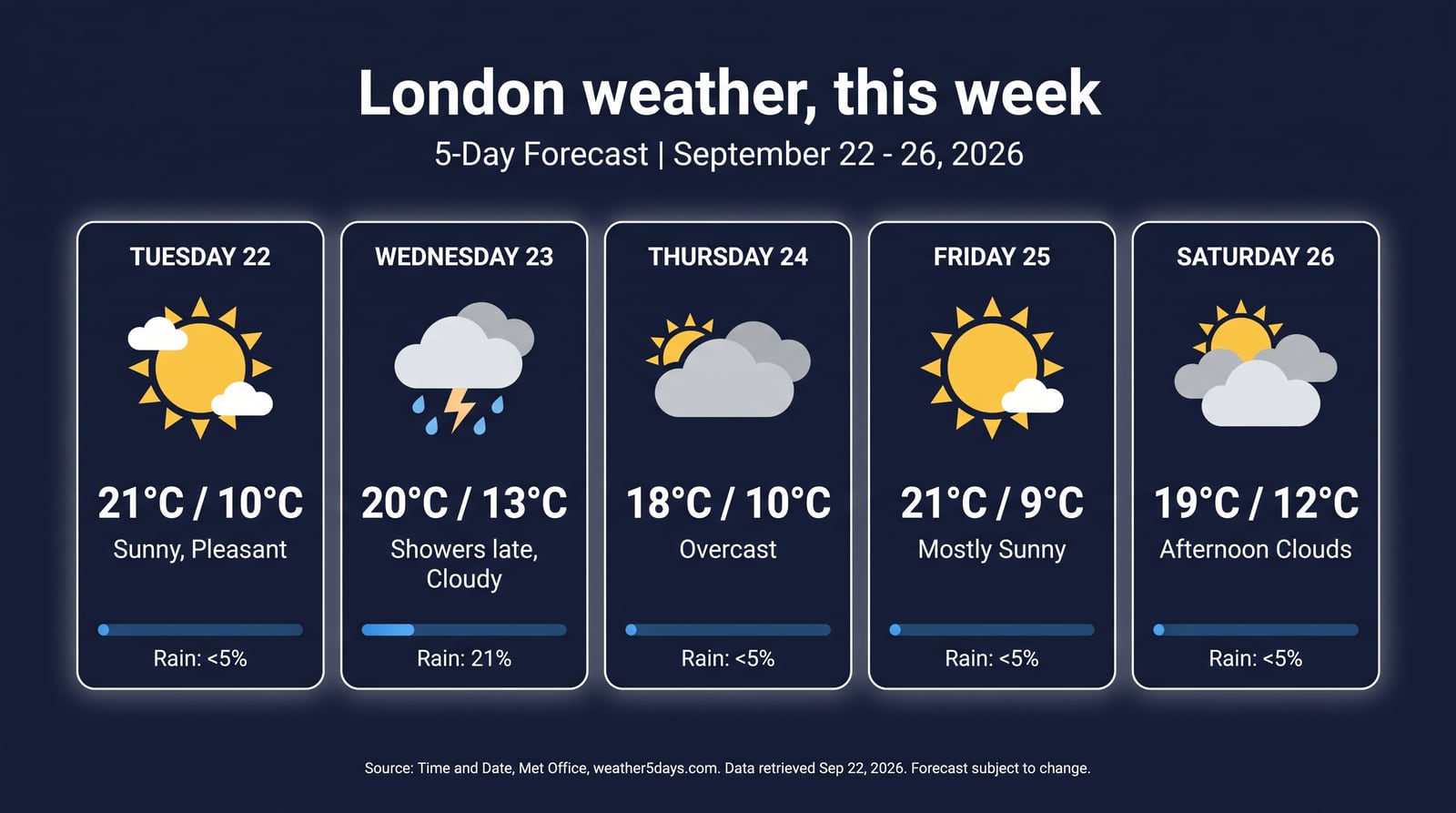
Prompt: "A polished editorial infographic poster: London weather, this week. Use real forecast data from search for the next 5 days..." - gemini-3-pro-image, 16:9, 2K.
Text that's actually spelled correctly. This is the thing Nano Banana Pro does that the previous generation of image models couldn't. Every label here is straight out of the model.
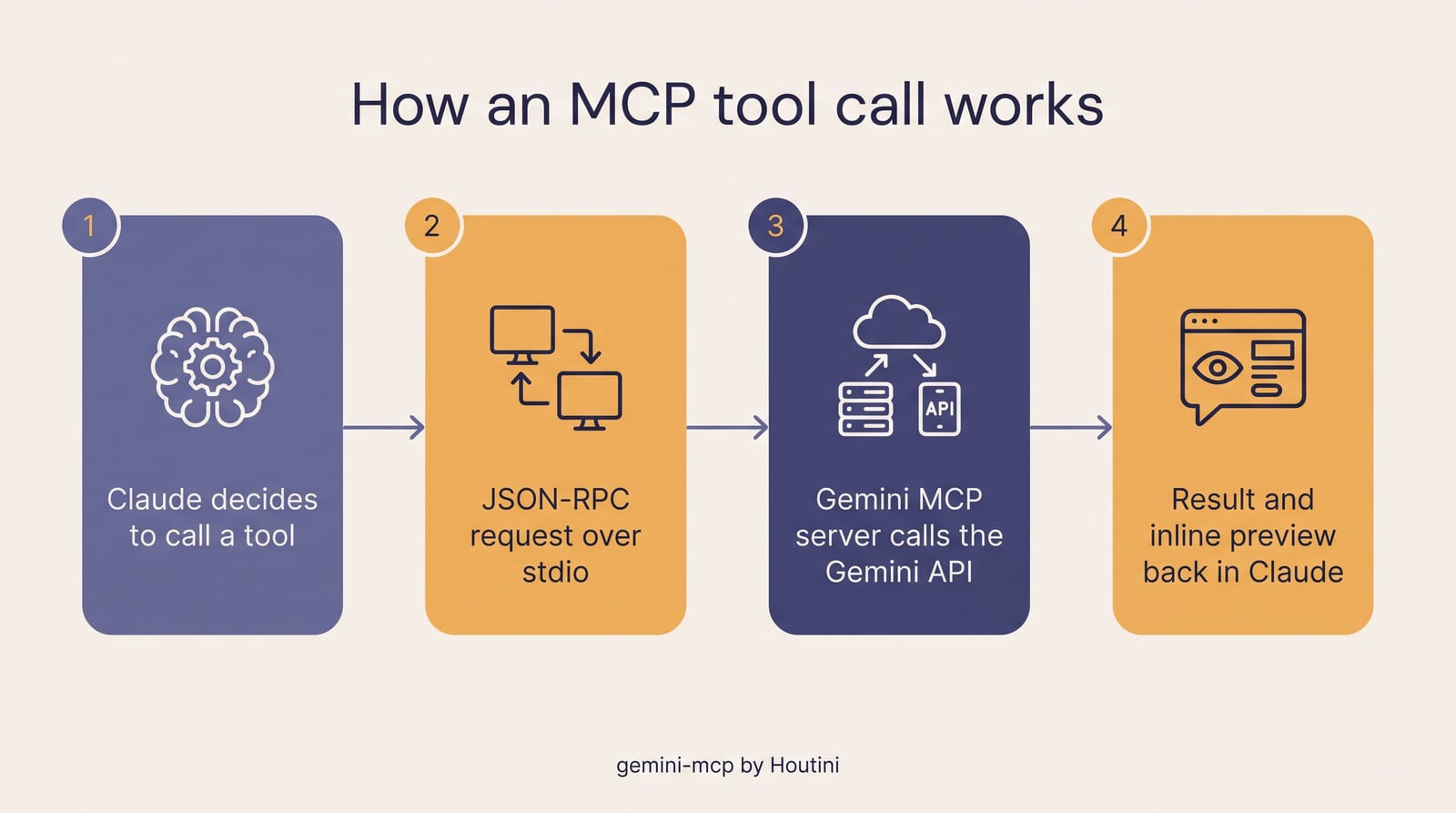
Prompt: "A clean, magazine-quality infographic titled How an MCP tool call works, with four numbered steps..." - gemini-3-pro-image.
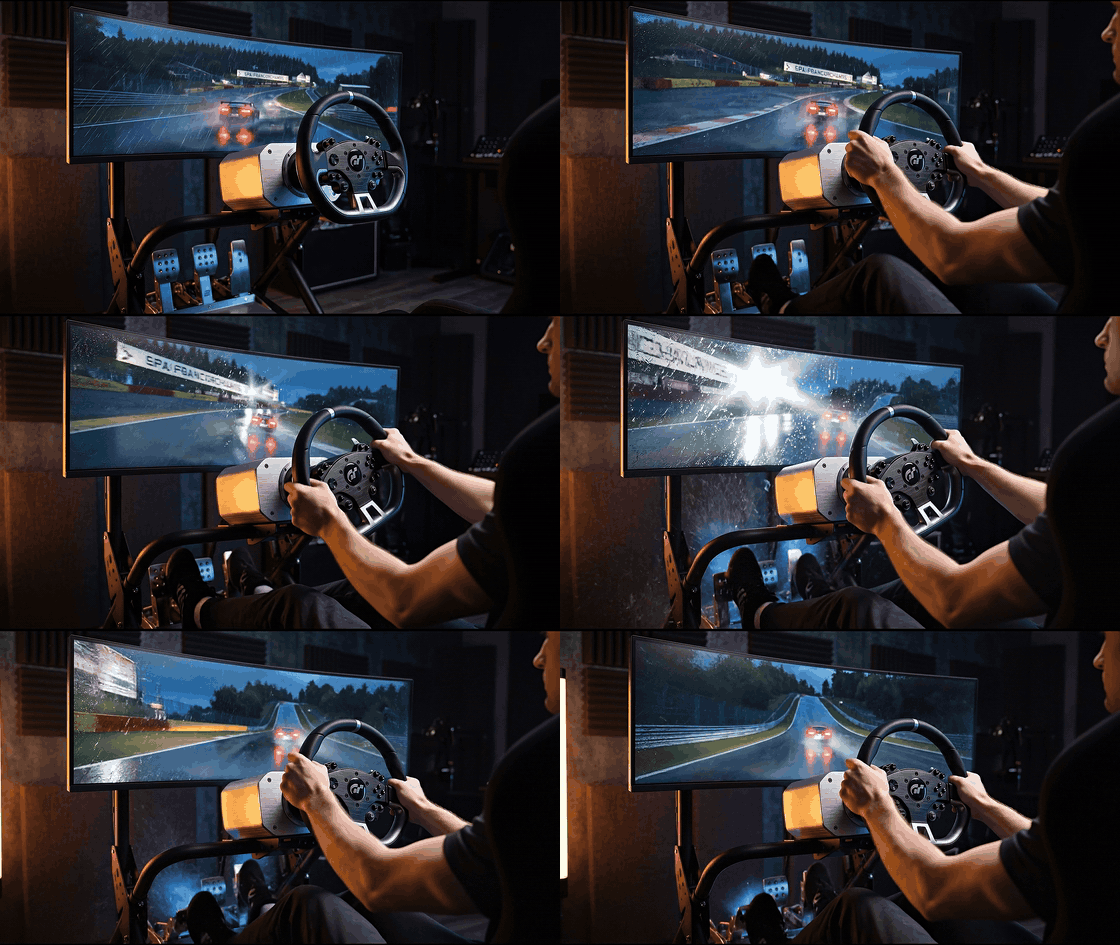
Generate, then edit. Left is generate_image. Right is edit_image on that file with one sentence of instructions: change the track to Monza in daylight, swap the rim lighting for window light, make the pedals red. Same cockpit, same camera angle.
generate_image |
edit_image |
|---|---|
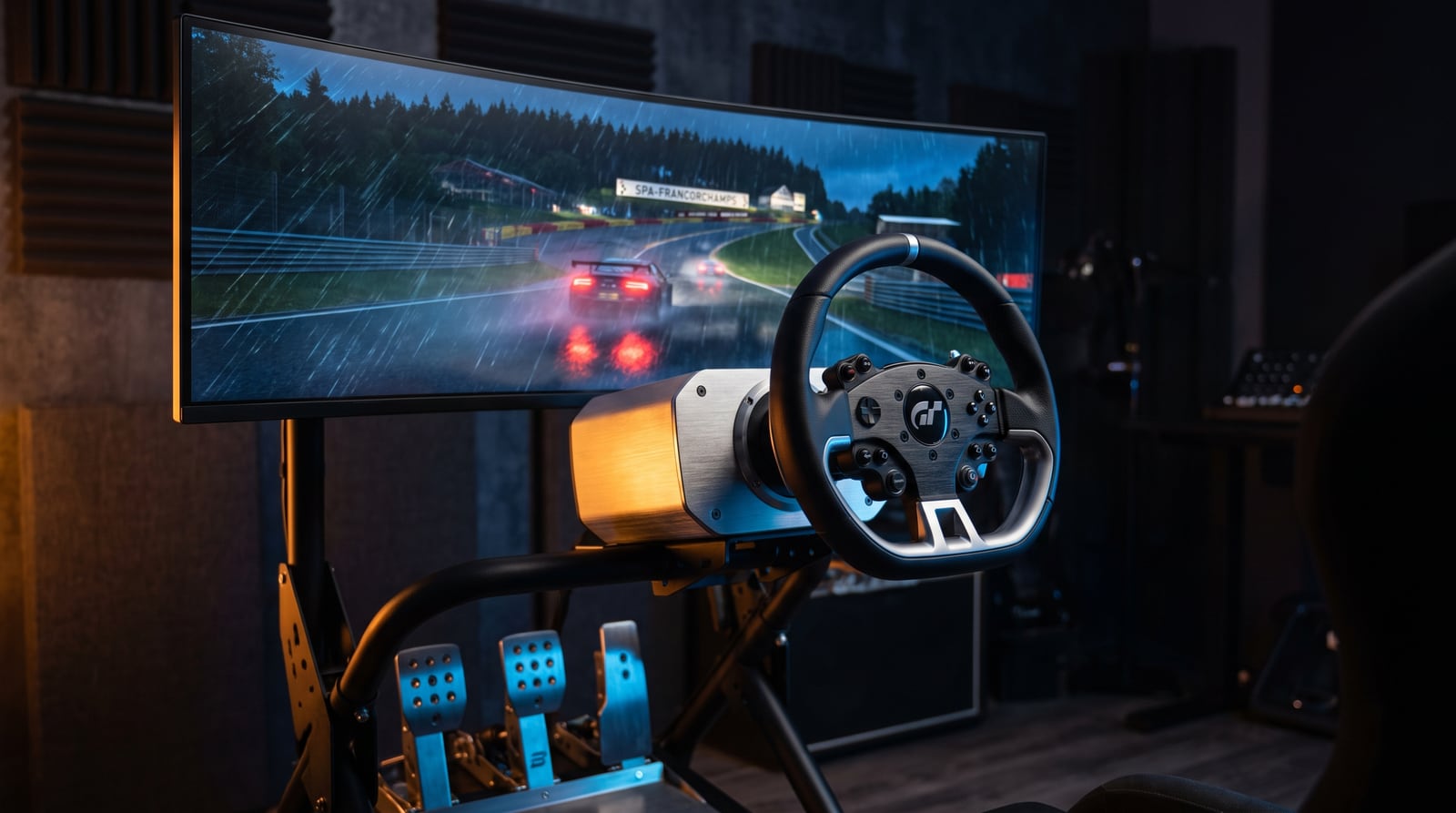 |
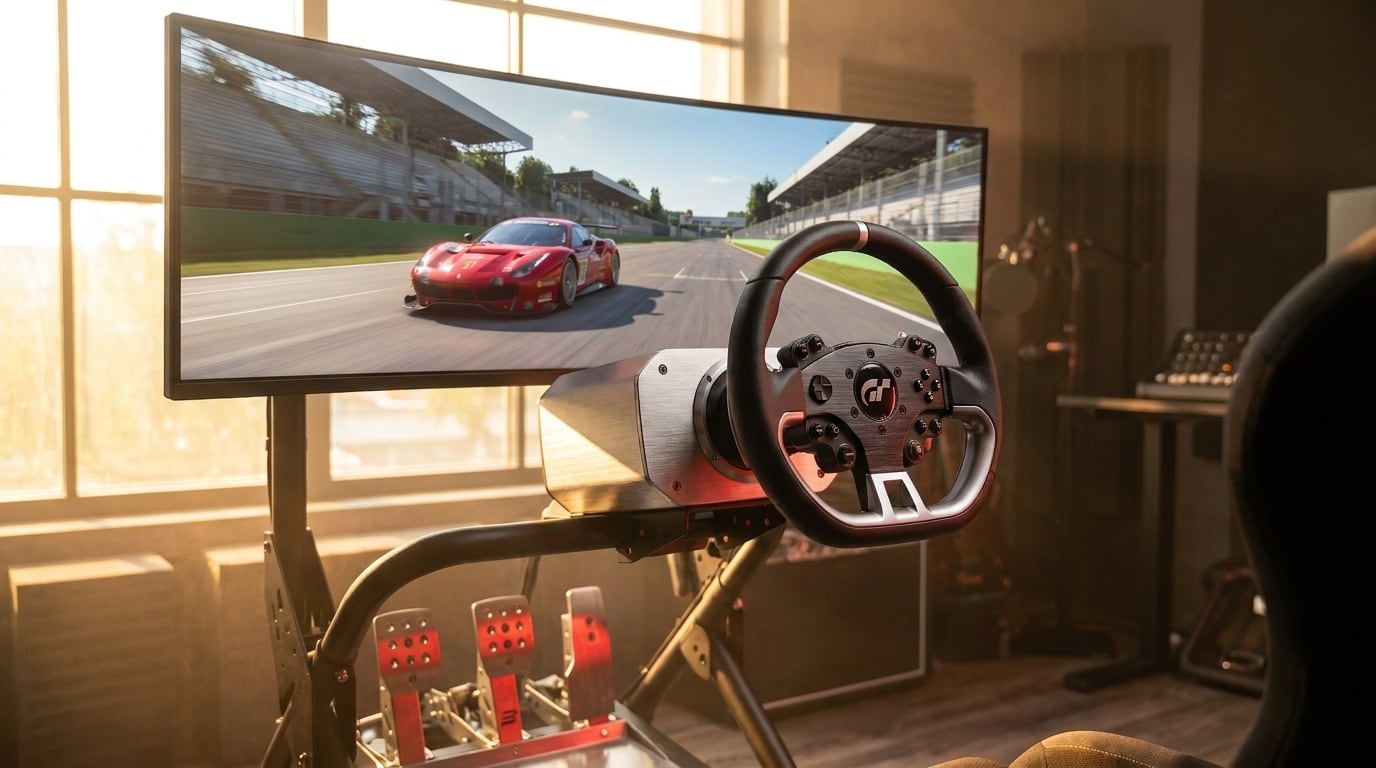 |
Image to video with Veo 3.1. The night-time cockpit above, passed to generate_video as firstFrameImage. Eight seconds at 1080p with generated audio (engine note, tyre hiss) - the GIF below is silent and squashed for GitHub, the real file is a proper MP4.
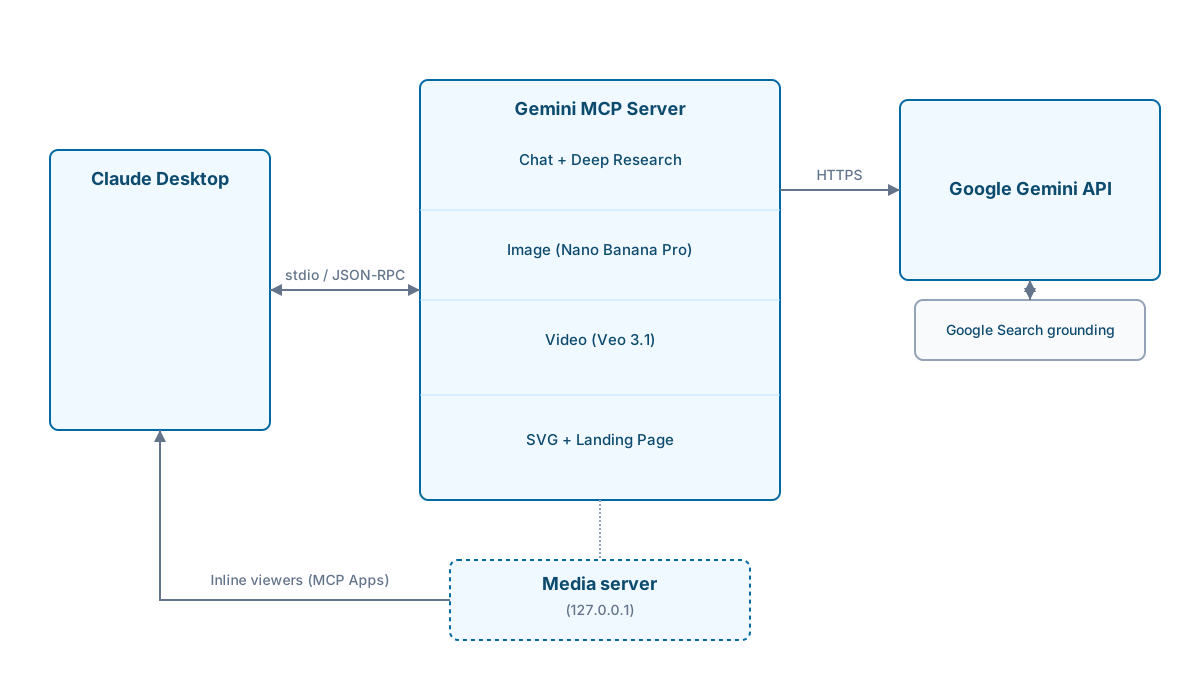
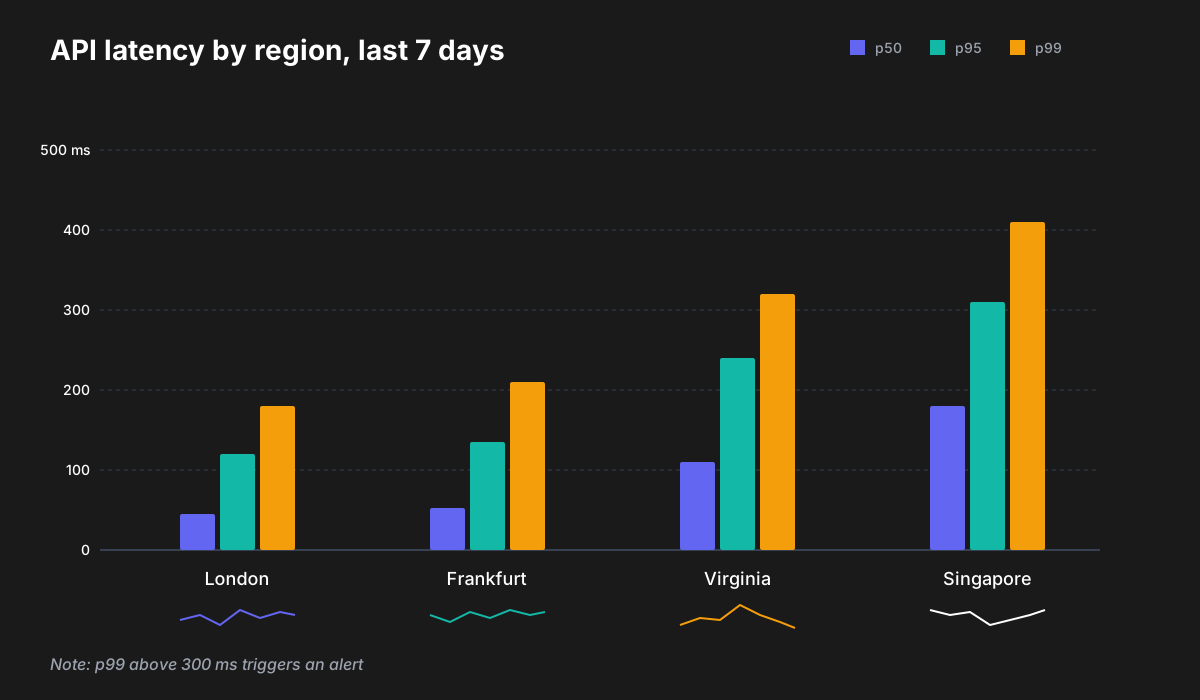
SVG that you can actually use. Not a picture of a diagram - real vector markup you can drop into a page, edit by hand or commit to a repo. Both of these are the raw .svg files the tool wrote to disk.
generate_svg style=technical |
generate_svg style=data-viz |
|---|---|
 |
 |
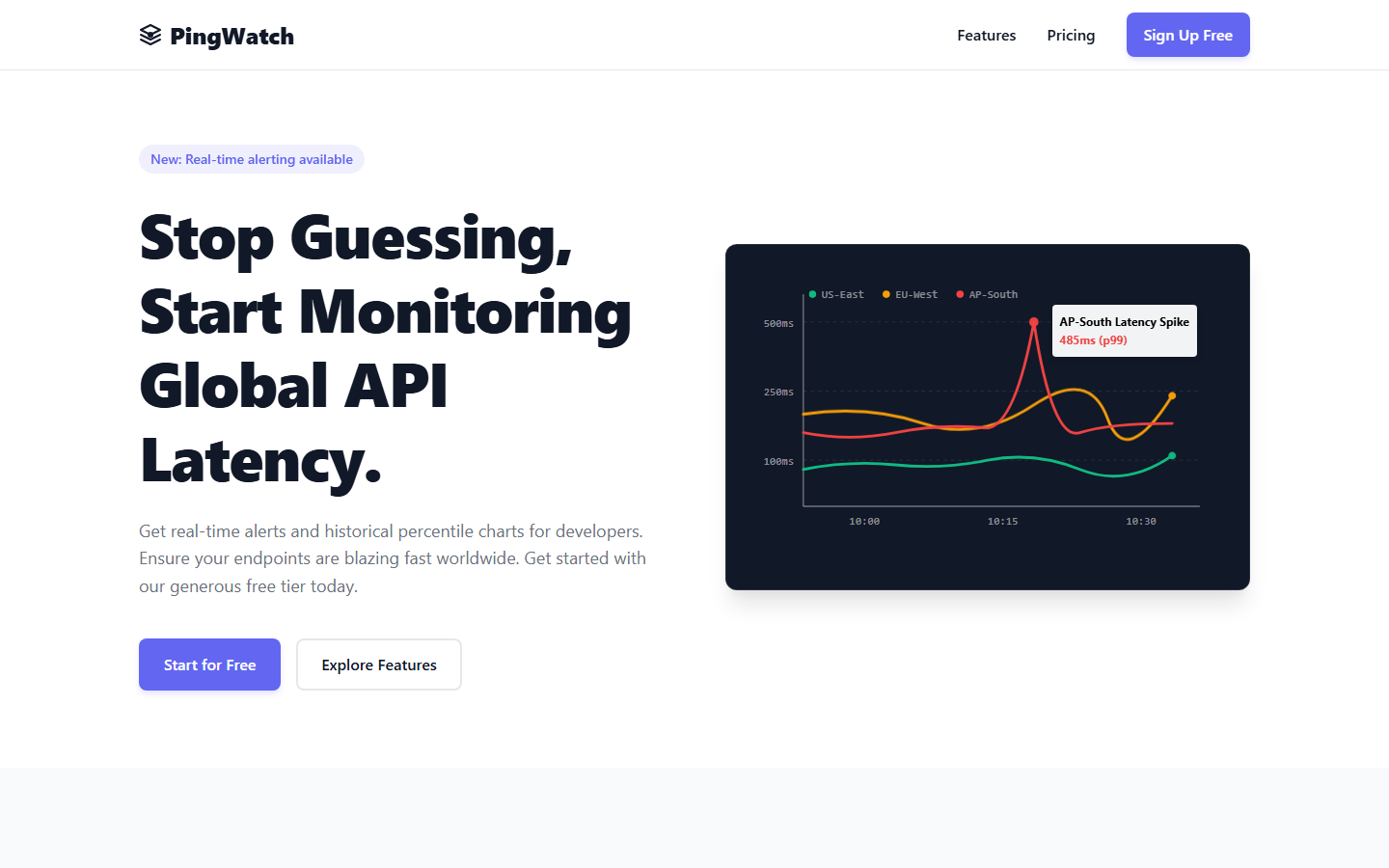
A landing page from a paragraph. generate_landing_page with a brief, a company name and a brand colour. Self-contained HTML, inline CSS, the little chart in the hero is animated SVG. Screenshot of the file opened in Chrome, nothing else touched.
And the fast one. Nano Banana 2 (gemini-3.1-flash-image) for when you want volume rather than 4K. This took about ten seconds.
Get started in two minutes
Step 1: Get a Gemini API key
Go to Google AI Studio and create one.
A word on the free tier, because the defaults lean on a paid model. Google's pricing page (as of 24 September 2026) gives Gemini 3 Flash Preview a free tier, but Gemini 3.1 Pro Preview is paid-only - and 3.1 Pro is the default for gemini_chat, gemini_deep_research (synthesis), analyze_image and generate_landing_page. On a free key those calls will fail unless you point them at a free model: set GEMINI_DEFAULT_MODEL=gemini-3-flash-preview (covers chat and landing pages), GEMINI_DEEP_RESEARCH_MODEL and GEMINI_IMAGE_ANALYSIS_MODEL likewise, or pass model per call. generate_svg already defaults to gemini-3-flash-preview. Check the pricing page for the other models before relying on them - Google changes these tiers.
Step 2: Add to your Claude Desktop config
Config file locations:
- Windows:
C:\Users\{username}\AppData\Roaming\Claude\claude_desktop_config.json - macOS:
~/Library/Application Support/Claude/claude_desktop_config.json
{
  "mcpServers": {
    "gemini": {
      "command": "npx",
      "args": ["@houtini/gemini-mcp"],
      "env": {
        "GEMINI_API_KEY": "your-api-key-here"
      }
    }
  }
}
Step 3: Restart Claude Desktop
That's it. Tools show up automatically. npx pulls the package on first run, so there's no separate install.
Local build instead
For development, or if you'd rather not rely on npx:
git clone https://github.com/houtini-ai/gemini-mcp
cd gemini-mcp
npm install --include=dev
npm run build
Then point your config at the local build:
{
  "mcpServers": {
    "gemini": {
      "command": "node",
      "args": ["C:/path/to/gemini-mcp/dist/index.js"],
      "env": {
        "GEMINI_API_KEY": "your-api-key-here"
      }
    }
  }
}
Claude Code (CLI)
Claude Code doesn't read claude_desktop_config.json. Use claude mcp add instead:
claude mcp add -e GEMINI_API_KEY=your-api-key-here -s user gemini -- npx -y @houtini/gemini-mcp
With an output directory for images and video:
claude mcp add \
  -e GEMINI_API_KEY=your-api-key-here \
  -e GEMINI_IMAGE_OUTPUT_DIR=/path/to/output \
  -s user \
  gemini -- npx -y @houtini/gemini-mcp
Check with claude mcp get gemini - you want to see Status: Connected.
What it does
Chat with Google Search grounding
Use gemini:gemini_chat to ask: "What changed in the MCP spec in the last month?"
Grounding is on by default. Gemini searches Google before it answers, so you get this month's information rather than a training-cutoff guess, and the sources come back as markdown links. For questions where you want pure reasoning ("explain this code", that sort of thing) set grounding: false.
Runs on gemini-3.1-pro-preview unless you say otherwise. Pass model: "gemini-3.8-flash" if you'd rather have speed than depth. thinking_level works on every Gemini 3.x model: high for the hard stuff, low to keep it snappy.
Deep research
Use gemini:gemini_deep_research with:
  research_question="What are the current approaches to AI agent memory management?"
  max_iterations=5
Runs grounded search passes and then writes them up as one report. The passes run on gemini-3.8-flash with low thinking (they're gathering facts, not reasoning about them), and the synthesis at the end runs on gemini-3.1-pro-preview with high thinking. Two passes plus a synthesis is the default and lands in two to three minutes.
That split matters more than it sounds. Earlier versions ran everything on Pro with full thinking, and one pass on a broad question could run past Claude Desktop's four-minute timeout on its own. Keep max_iterations at 2 or 3 in Claude Desktop; in an IDE or an agent framework, 5 to 7 produces noticeably better synthesis. focus_areas takes an array if you want to steer each pass.
Image generation with search grounding
Use gemini:generate_image with:
  prompt="Stock price chart showing Apple (AAPL) closing prices for the last 5 trading days"
  use_search=true
  aspectRatio="16:9"
Default model is gemini-3-pro-image, which is Nano Banana Pro now that it's out of preview. It renders legible text, does 4K, and it's the only one that supports conversational editing. gemini-3.1-flash-image (Nano Banana 2) is the fast option - not far off in quality, a fraction of the time and the cost. There's a Lite variant too if you're doing hundreds.
With use_search=true, Gemini looks things up before it draws. Weather, prices, sports results, that kind of data-driven image works reliably. The full-resolution file always goes to disk; the inline preview is resized to fit the MCP transport cap but the original is untouched.
Video generation with Veo 3.1
Use gemini:generate_video with:
  prompt="A close-up shot of a futuristic coffee machine brewing a glowing blue espresso, steam rising dramatically. Cinematic lighting."
  resolution="1080p"
  durationSeconds=8
Google's Veo 3.1. Four to eight second clips at up to 4K with native, synchronised audio. It's asynchronous on Google's side and takes two to five minutes; the tool polls until it's ready so you don't have to.
Options worth knowing about:
aspectRatio-16:9landscape or9:16for verticalgenerateAudio- on by default; dialogue and effects that match the promptfirstFrameImage- animate from a still (that's how the cockpit clip above was made)referenceImages- up to three, for character or style consistencysampleCount- up to four variations in one callseed- deterministic output across runsgenerateThumbnail- pulls a frame out with ffmpeg, if you've got it in PATHmodel-veo-3.1-lite-generate-previewif you want cheaper and faster
SVG generation
This is the one people underestimate. The output isn't a picture of a diagram, it's the SVG markup itself - drop it into a codebase, a slide, a web page, and it scales without a single raster artefact.
Use gemini:generate_svg with:
  prompt="Architecture diagram showing a microservices system with API gateway, three services, and a shared database"
  style="technical"
  width=1000
  height=600
Four styles:
| Style | Best for |
|---|---|
technical |
Architecture diagrams, flowcharts, system maps |
artistic |
Illustrations, decorative graphics, icons |
minimal |
Clean data visualisations, simple charts |
data-viz |
Charts, dashboards, infographics |
You get real SVG code back. Edit it, animate it, embed it, commit it. No export step, no Figma.
Runs on gemini-3-flash-preview unless you pass model - it's quick, it handles SVG markup comfortably, and it has a free tier. Pass model: "gemini-3.1-pro-preview" for denser diagrams if you're on a paid key.
Image editing and analysis
Conversational editing. Nano Banana Pro keeps context between turns. Pass the thought signature from the previous call back in and it remembers what it was working on:
Use gemini:edit_image with:
  prompt="Change the colour scheme to blue and green"
  images=[{filePath: "C:/output/gemini-123.png", thoughtSignature: "fromPreviousCall"}]
Analysis, two tools for two jobs:
describe_image- quick general descriptions ongemini-3.8-flashanalyze_image- structured extraction and proper reasoning ongemini-3.1-pro-preview
Local files:
Use gemini:load_image_from_path with filePath="C:/screenshots/error.png"
Or just pass filePath straight into any image tool's images array and the server reads it itself - that skips the MCP transport limit entirely.
Media resolution control
Cut token usage by up to 75% where the task doesn't need the detail:
| Level | Tokens | Savings | Best for |
|---|---|---|---|
MEDIA_RESOLUTION_LOW |
280 | 75% | Simple tasks, bulk operations |
MEDIA_RESOLUTION_MEDIUM |
560 | 50% | PDFs and documents (OCR saturates here) |
MEDIA_RESOLUTION_HIGH |
1120 | default | Detailed analysis |
MEDIA_RESOLUTION_ULTRA_HIGH |
2000+ | per-image only | Maximum detail |
For PDF OCR, MEDIUM gives me identical text extraction to HIGH at half the tokens. I've not found a case where it didn't.
Landing page generation
Use gemini:generate_landing_page with:
  brief="A SaaS tool that helps developers monitor API latency"
  companyName="PingWatch"
  primaryColour="#6366F1"
  style="startup"
  sections=["hero", "features", "pricing", "cta"]
One self-contained HTML file: inline CSS, vanilla JS, no external dependencies. Styles are minimal, bold, corporate and startup. The PingWatch page in the gallery above is exactly this call.
Professional chart design systems
gemini_prompt_assistant carries nine chart design systems you can ask for by name:
| System | Inspiration | Best for |
|---|---|---|
| storytelling | Cole Nussbaumer Knaflic | Executive presentations |
| financial | Financial Times | Editorial journalism - FT pink, serif titles |
| terminal | Bloomberg / fintech | High-density dark mode with neon |
| modernist | W.E.B. Du Bois | Bold geometric blocks, stark contrasts |
| professional | IBM Carbon / Tailwind | Enterprise dashboards |
| editorial | FiveThirtyEight / Economist | Data journalism |
| scientific | Nature / Science | Academic rigour |
| minimal | Edward Tufte | Maximum data-ink ratio |
| dark | Observable | Modern dark mode |
Help system
Use gemini:gemini_help with topic="overview"
The full documentation without leaving Claude. Topics: overview, image_generation, image_editing, image_analysis, chat, deep_research, grounding, media_resolution, models, all.
Image output and storage
By default, images come back as inline previews rendered directly in Claude, and the full-size file is written next to the package. Set GEMINI_IMAGE_OUTPUT_DIR if you'd rather they all landed somewhere sensible:
"env": {
  "GEMINI_API_KEY": "your-api-key-here",
  "GEMINI_IMAGE_OUTPUT_DIR": "C:/Users/username/Pictures/gemini-output"
}
Two files per image:
| File | What it is |
|---|---|
| Full-res | Saved to disk immediately, untouched |
| Preview | Resized JPEG for inline transport, sized to fit under the cap |
Gemini returns 2 to 5 MB images. The resize measures the non-image overhead in each response, works out the binary budget left, and steps the preview down (800, 600, 400, 300, 200px) until it fits under the 1 MB MCP transport limit. The full image is always there on disk.
Inline viewers in Claude Desktop
Image, SVG, video and landing-page results each open in an MCP App viewer with zoom, the saved path and a copy button. If you're on Claude Desktop and the viewer sat on "Waiting for image..." forever in an older version, that was Claude Desktop stripping the structured data the viewer reads (ext-apps#696). Since 2.7.0 the viewer fetches it back from the server itself, so it renders either way.
Configuration reference
| Variable | Required | Default | Description |
|---|---|---|---|
GEMINI_API_KEY |
Yes | - | Google AI API key from AI Studio |
GEMINI_DEFAULT_MODEL |
No | gemini-3.1-pro-preview |
Model for gemini_chat |
GEMINI_DEEP_RESEARCH_MODEL |
No | gemini-3.1-pro-preview |
Synthesis model for gemini_deep_research |
GEMINI_DEEP_RESEARCH_SEARCH_MODEL |
No | gemini-3.8-flash |
Model for the grounded search passes in gemini_deep_research |
GEMINI_IMAGE_ANALYSIS_MODEL |
No | gemini-3.1-pro-preview |
Model for analyze_image |
GEMINI_IMAGE_DESCRIBE_MODEL |
No | gemini-3.8-flash |
Model for describe_image |
GEMINI_IMAGE_GENERATION_MODEL |
No | gemini-3-pro-image |
Model for generate_image and edit_image |
GEMINI_DEFAULT_GROUNDING |
No | true |
Set to false to turn Google Search grounding off by default |
GEMINI_IMAGE_OUTPUT_DIR |
No | - | Where generated images and videos are saved |
GEMINI_ALLOW_EXPERIMENTAL |
No | false |
Include experimental and preview models in auto-discovery |
GEMINI_REQUEST_TIMEOUT_MS |
No | 240000 |
Per-request timeout for chat and analysis calls, in milliseconds |
GEMINI_MCP_RETRY_ATTEMPTS |
No | 3 |
Total attempts per Gemini API request. Transient network failures (fetch failed, ECONNRESET, proxy or VPN drops) are retried with backoff. 1 disables it |
GEMINI_MCP_LOG_FILE |
No | false |
Write logs to ~/.gemini-mcp/logs/ |
DEBUG_MCP |
No | false |
Log to stderr for debugging tool calls |
Tools reference
| Tool | Description |
|---|---|
gemini_chat |
Chat with Gemini 3.1 Pro. Google Search grounding on by default. Supports thinking_level |
gemini_deep_research |
Grounded search passes on Flash, synthesised into a report by 3.1 Pro. Default 2 passes |
gemini_list_models |
Lists the models your API key can see, live |
gemini_help |
Documentation for every tool without leaving Claude |
gemini_prompt_assistant |
Expert guidance for image generation with nine chart design systems |
generate_image |
Image generation with optional search grounding. Full-res saved to disk |
edit_image |
Edit images with natural-language instructions. Multi-turn continuity via thought signatures |
describe_image |
Fast image descriptions on Gemini 3.8 Flash |
analyze_image |
Structured extraction and analysis on Gemini 3.1 Pro |
load_image_from_path |
Read a local image file and return base64 for any image tool |
generate_video |
Video generation with Veo 3.1: 4 to 8 seconds at up to 4K with native audio |
generate_svg |
Production-ready SVG: diagrams, illustrations, icons, data visualisations |
generate_landing_page |
Self-contained HTML landing pages with inline CSS and JS |
gemini_viewer_payload |
Internal. The inline viewers use it to fetch their display data; you'll never call it |
Model reference
Checked against the live models API on 22 September 2026. gemini_list_models will tell you what your key can see today.
| Model | Used by | Notes |
|---|---|---|
gemini-3.1-pro-preview |
gemini_chat, gemini_deep_research (synthesis), analyze_image, generate_landing_page |
Default. Still the strongest reasoning model Google ships, preview label or not. Paid-only - no free tier |
gemini-3.8-flash |
describe_image, gemini_deep_research (search passes) |
Default. Google's GA workhorse as of September 2026; a good gemini_chat choice when you want speed |
gemini-3-flash-preview |
generate_svg |
Default. Has a free tier (Google pricing page, 24 September 2026) |
gemini-3.7-flash, 3.6, 3.5, 3.5-flash-lite, 3.1-flash-lite |
any text tool | Earlier GA Flash releases, all accepted |
gemini-3-pro-image |
generate_image, edit_image |
Default. Nano Banana Pro, GA. 4K, real text, conversational editing |
gemini-3.1-flash-image |
generate_image, edit_image |
Nano Banana 2, GA. Near-Pro quality, Flash speed and price |
gemini-3.1-flash-lite-image |
generate_image |
Nano Banana 2 Lite. Fastest and cheapest |
gemini-3-pro-image-preview, nano-banana-pro-preview, gemini-2.5-flash-image |
image tools | Older IDs, still accepted so existing configs keep working |
veo-3.1-generate-preview |
generate_video |
Default. Cinematic, native audio, up to 4K |
veo-3.1-lite-generate-preview |
generate_video |
Cheaper and faster on the same API |
Why the defaults are what they are. I went back and forth on this. Gemini 3.8 Flash is GA and newer, but 3.1 Pro is still what Google calls its strongest reasoning model, and reasoning is the point of gemini_chat and deep research - so Pro stays the default there, and Flash takes the lighter describe_image job. For images, Nano Banana Pro left preview and kept its quality lead, so it's the default; Nano Banana 2 is there when you'd rather trade a little quality for a lot of speed. Gemini's newer Omni video model uses a different API, so it's not wired in yet.
Gemini 3 notes: temperature is forced to 1.0 on every 3.x model (Google's requirement, lower values cause looping). thinking_level applies to gemini_chat.
Token budgets: max_tokens defaults to each model's full output ceiling as reported live by the models API (65,536 on current Gemini 3 text models; the 1M figure is input context). It's a cap, not consumption, so unused headroom costs nothing. Values below 4,096 are ignored because Gemini 3 thinking burns tiny budgets before you see any output, which looks exactly like a timeout, and values above the model's real limit are clamped.
Requirements
- Node.js 18+
- A Gemini API key from Google AI Studio
- ffmpeg (optional, for video thumbnails)
Licence
Apache-2.0