A comprehensive Model Context Protocol (MCP) server that enables AI assistants to control Unreal Engine through the native C++ Automation Bridge plugin. Built with TypeScript and C++.
Install
https://server.smithery.ai/@ChiR24/unreal_mcp/mcpTransport: streamable-http
Authorizationoptional — Bearer token for Smithery authentication
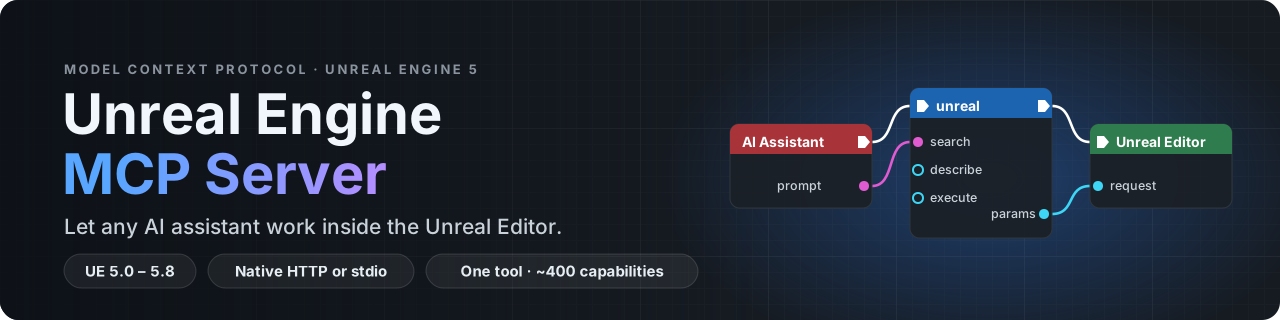








Connect Claude, Cursor, VS Code or any other MCP client to a running Unreal Editor,
and let it build levels, Blueprints, UI, materials, effects and more, through a native C++ editor plugin.
🧭 One tool, nearly 400 capabilities · ⚙️ Native C++ editor plugin · 🌐 HTTP or stdio · 🔐 Local and token-protected by default · 🎮 Unreal Engine 5.0 – 5.8
🚀 Quick Start · 📖 Wiki · 📦 Releases · 💬 Discussions
📌 Which version is this? This README describes the 0.6 line: the
devbranch and npmunreal-engine-mcp-server@beta. The previous stable release, 0.5.30 (npmlatest), exposes 23 separate tools instead of one; see Upgrading from 0.5.x.
Contents · What it does · How it works · Quick start · The unreal tool · Configuration · Security · Engine plugins · Docker · Documentation · Development · Community
What it does
🏗️ Levels and actors |
🧩 Blueprints and UI |
🎨 Materials and worlds |
🕹️ Gameplay |
🎬 Cinematics and audio |
🧪 Play and verify |
Nearly 400 capabilities in all, behind a single MCP tool. The assistant finds them by searching in plain words, so nobody has to learn their names. The full list is the generated Action Reference.
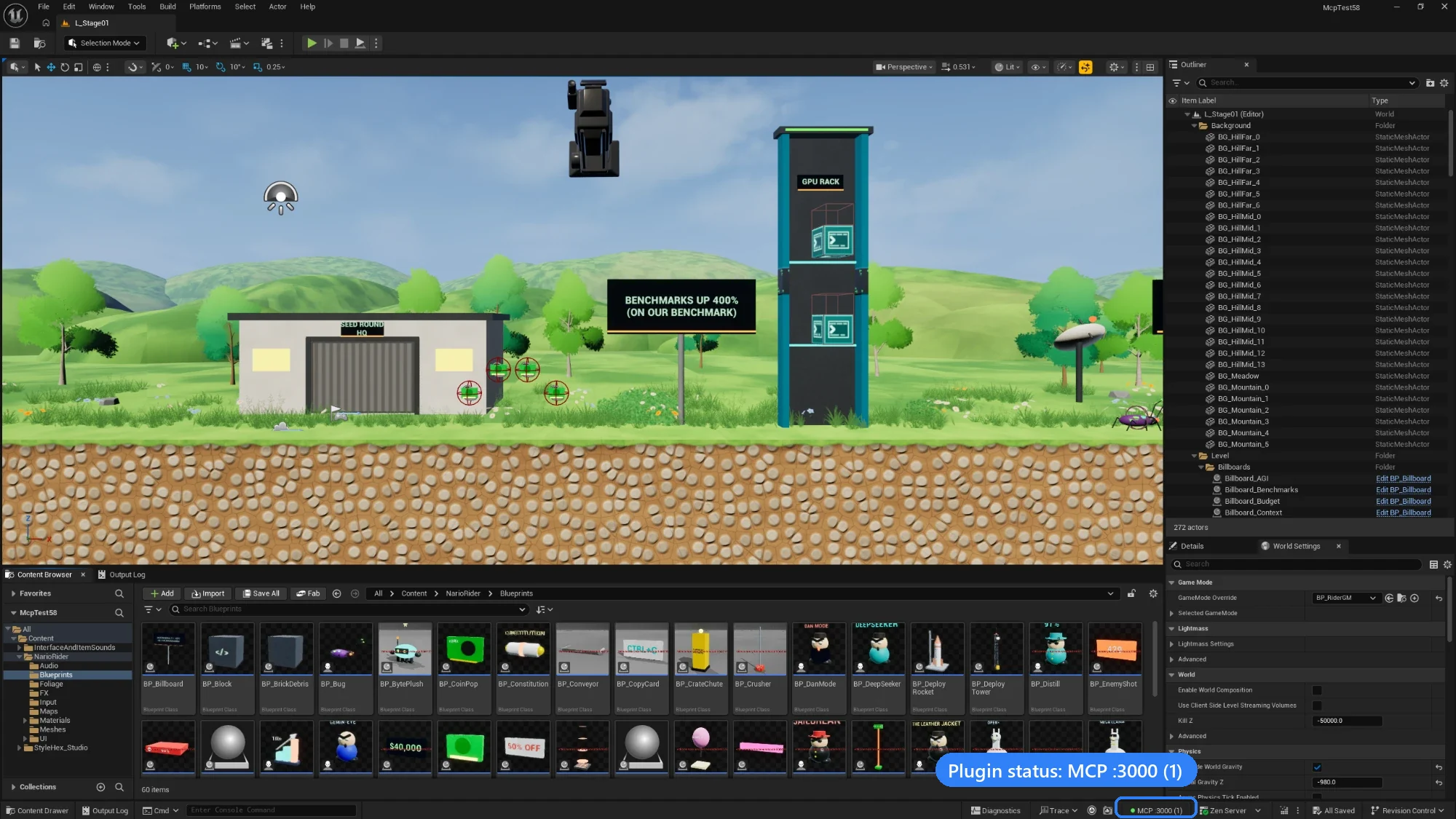
A platformer level built with the MCP, in Unreal Editor 5.8. Bottom right: the plugin's status, MCP :3000 (1), meaning the native server is running on port 3000 with one client connected.
How it works
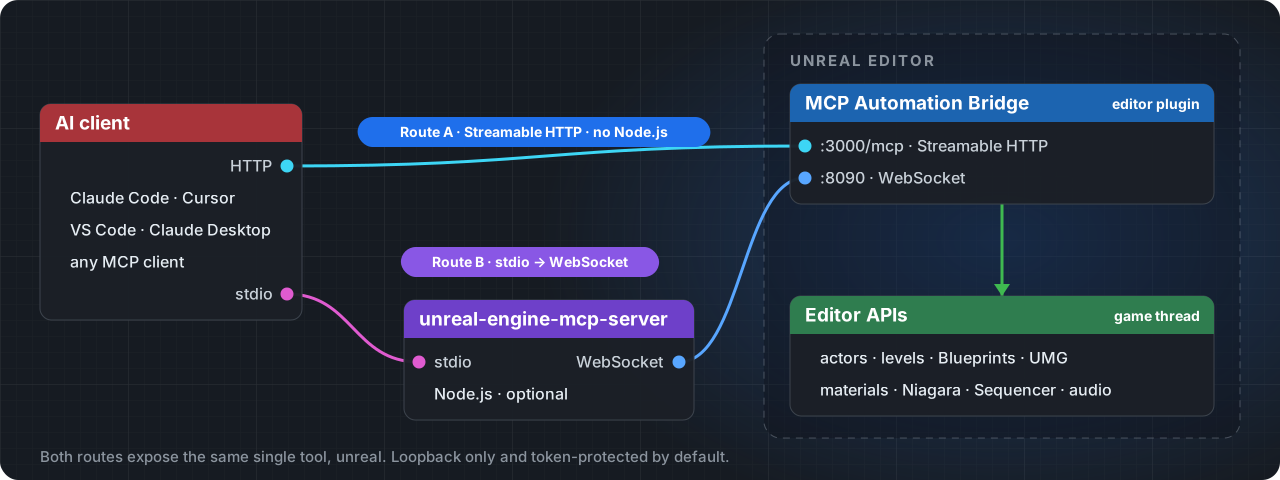
The MCP Automation Bridge plugin runs inside the editor and does all the work, on the editor's game thread. Clients reach it in one of two ways, and both expose the same single tool, unreal:
| 🌐 Route A · Native HTTP | 🧩 Route B · stdio | |
|---|---|---|
| Path | Client → the plugin's Streamable HTTP server at http://127.0.0.1:3000/mcp |
Client → unreal-engine-mcp-server (Node.js, stdio) → the plugin's WebSocket on 127.0.0.1:8090 |
| Node.js | Not needed | 20.19 or later |
| Capability token | The client sends it in the X-MCP-Capability-Token header |
Read from the project, given UE_PROJECT_PATH |
| Best for | Claude Code, Cursor, VS Code, and several clients sharing one editor | Claude Desktop, and clients that only launch local commands |
Everything listens on 127.0.0.1 and requires the project's capability token unless you change it.
Quick start
The Quick Start page walks through this with screenshots. You need Unreal Engine 5.0 to 5.8 and a project with C++ code; a Blueprint-only project can use prebuilt binaries.
1. Add the plugin
Download McpAutomationBridge-plugin-<version>.zip from the newest v0.6 pre-release on the Releases page, and copy the McpAutomationBridge folder it contains into your project:
MyGame/Plugins/McpAutomationBridge/
Or use a clone of this repository: copy plugins/McpAutomationBridge/, or reference the folder from your .uproject with "AdditionalPluginDirectories": ["C:/Path/To/Unreal_mcp/plugins"].
Open the project and let Unreal rebuild the plugin. When it's loaded, the status bar shows MCP off. If you see "Engine modules cannot be compiled at runtime", build the project once in Visual Studio, Rider or Xcode. More in Installation.
https://github.com/user-attachments/assets/d8b86ebc-4364-48c9-9781-de854bf3ef7d
Prebuilt binaries (Blueprint-only projects, teams)Build the plugin once on a machine with the engine and a compiler, then hand out the zip. No compiler is needed on the target machine:
node scripts/package-plugin.mjs "C:/Program Files/Epic Games/UE_5.7"
This writes build/McpAutomationBridge-v<version>-UE5.7-<Platform>.zip, where <version> is the package.json version (currently 0.6.0-beta-b). Unzip it into YourProject/Plugins/. Binaries only work with the engine minor and platform they were built for: a 5.6 build won't load in 5.5, 5.7 or 5.8.
2. Connect your client
Route A · Native HTTP (no Node.js)
In Edit › Project Settings › Plugins › MCP Automation Bridge, tick Enable Native MCP Server (port
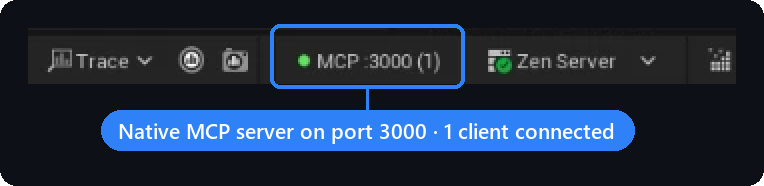
3000by default), then restart the editor. The status bar now readsMCP :3000 (0).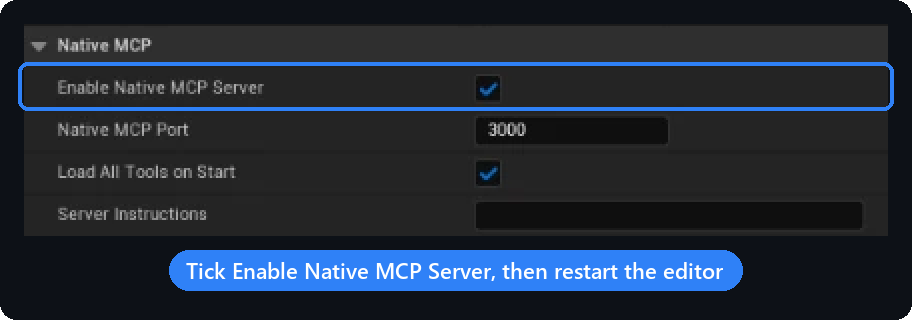
Read the capability token the plugin generated:
<YourProject>/Saved/MCP/capability-token. Treat it like a password.Add the server to your client and send the token in the
X-MCP-Capability-Tokenheader. Claude Code:claude mcp add --transport http unreal-engine http://127.0.0.1:3000/mcp --header "X-MCP-Capability-Token: <token>"Or in a project
.mcp.json(Claude Code), reading the token from an environment variable:{ "mcpServers": { "unreal-engine": { "type": "http", "url": "http://127.0.0.1:3000/mcp", "headers": { "X-MCP-Capability-Token": "${UNREAL_MCP_TOKEN}" } } } }Cursor (
.cursor/mcp.json) takes the sameurlandheaderswithouttype. VS Code, Windsurf and others: Connecting Clients.Check it: when the client connects, the count in the status bar goes up.
Route B · stdio (Node.js 20.19+)
Add this to your client's MCP configuration, for example Claude Desktop's claude_desktop_config.json:
{
  "mcpServers": {
    "unreal-engine": {
      "command": "npx",
      "args": ["-y", "unreal-engine-mcp-server@beta"],
      "env": {
        "UE_PROJECT_PATH": "C:/Path/To/YourProject"
      }
    }
  }
}
UE_PROJECT_PATH (the project folder or its .uproject) is how the server finds the capability token and the plugin's port, so nothing else needs setting. Keep the @beta tag: without it, npm installs 0.5.30, which doesn't match a 0.6 plugin.
3. Try it
With the editor open, ask your assistant to "list the actors in the current level", "spawn a point light 300 units above the origin", or "take a screenshot of the viewport". If it doesn't connect, see Troubleshooting.
The unreal tool
Both routes expose exactly one MCP tool, unreal, with four operations. Only the contract the model is about to use gets loaded, instead of hundreds of tool schemas:
| Operation | What it does |
|---|---|
search |
Finds capabilities from 2-4 plain words, such as spawn actor or save level. Every row carries a ready-to-send nextCall. |
describe |
Returns one capability's exact contract: parameters, schemas, an example, and the consent grant when one is needed |
execute |
Runs one capability with validated parameters and returns the data plus a receipt of what changed |
configure |
Enables or disables groups of internal tools; never touches the editor |
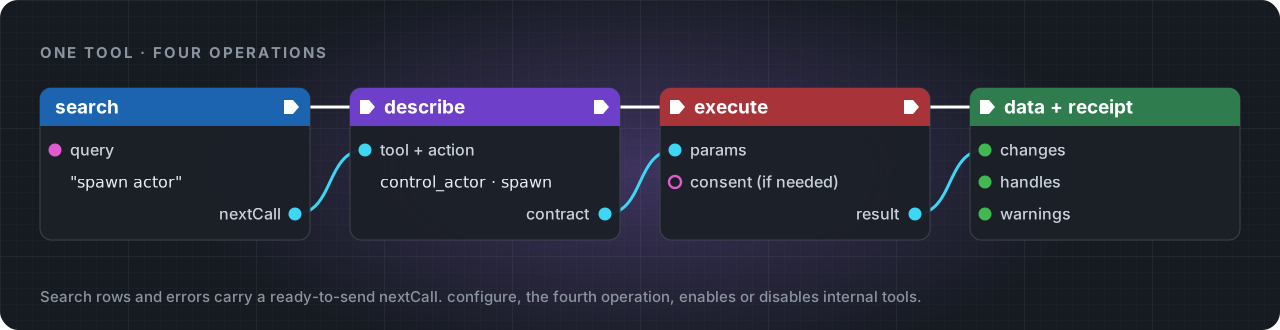
A typical exchange:
{ "operation": "search", "query": "spawn actor" }
{ "operation": "describe", "tool": "control_actor", "action": "spawn" }
{
  "operation": "execute",
  "tool": "control_actor",
  "action": "spawn",
  "params": { "classPath": "/Script/Engine.PointLight", "actorName": "KeyLight", "location": [0, 0, 300] }
}
- Parameters are strict. An undeclared name is refused with
UNDECLARED_PARAMETERand the list of allowed names; every error carries an executablenextCall. - Deletes need consent. 62 capabilities (all destructive ones, plus some writes) only run with the
consentGrantfromdescribe, passed back as a top-levelconsentfield. - Names. Both routes accept the
tool+actionpair; the stdio route also accepts a capability id, such as"capability": "control_actor.spawn".
Full reference with real replies: Using the Gateway.
Migrating from direct tool calls
The single unreal tool is permanent on both routes; there is no opt-out and no 23-tool listing to restore. A client that still calls a canonical tool name directly (tools/call with name: "manage_asset", name: "control_actor", …) receives a bounded, copy-paste-executable DIRECT_TOOL_CALL_REMOVED receipt instead of a routed call. Its nextCall drills exactly one level: { "operation": "search" } for an unknown name, { "operation": "describe", "tool": "<tool>" } when no action was given, or { "operation": "execute", "tool": "<tool>", "action": "<action>", "params": { ... } } when the call already named an action. Run that nextCall through unreal to finish the migration. See Upgrading.
Protocol versions
Both routes negotiate the MCP protocol version at initialize. The native /mcp transport supports 2025-11-25 (latest), 2025-06-18 and 2025-03-26; the stdio server also accepts the legacy 2024-11-05 and 2024-10-07. An unsupported MCP-Protocol-Version header on the native route gets HTTP 400. Details: docs/protocol.md.
unrealThese route requests inside the gateway; clients never list them. More in the Tools Reference.
| Category | Tool | Covers |
|---|---|---|
| Core | manage_asset |
Assets and folders, materials and material graphs, textures and render targets, data tables, structs, enums, source control |
| Core | manage_blueprint |
Blueprints, components, variables, event graphs, UMG widgets, layout, bindings, widget animations |
| Core | control_actor |
Spawning, transforms, attachment, components, materials, tags, placement audits |
| Core | control_editor |
Play-In-Editor, synthetic input, screenshots, viewport camera, undo, editor preferences |
| Core | manage_level |
Create, load, save, stream, import and export levels; world settings; lighting builds |
| Core | system_control |
Console commands, logs, project settings, profiling, builds and packaging, tests, Python |
| Core | inspect |
Read and write any UObject's properties, components and class info |
| Core | manage_tools |
Which internal tools are enabled (through configure) |
| World | build_environment |
Landscapes, foliage, lights and sky, water, weather, splines, procedural terrain |
| World | manage_level_structure |
Sublevels, World Partition, streaming, data layers, HLOD, volumes |
| World | manage_geometry |
Geometry Script meshes: booleans, deformers, UVs, collision, LODs |
| World | manage_pcg |
PCG graphs: create, add and connect nodes, execute |
| Gameplay | animation_physics |
Animation Blueprints, blend spaces, montages, skeletons, Control Rig and IK, ragdolls, cloth, vehicles |
| Gameplay | manage_character |
Character Blueprints, movement, MetaHuman |
| Gameplay | manage_combat |
Weapons, projectiles, hit detection |
| Gameplay | manage_effect |
Niagara systems, emitters and modules, debug shapes |
| Gameplay | manage_gas |
Gameplay Ability System: abilities, attributes, effects |
| Gameplay | manage_ai |
AI controllers, Behavior Trees, EQS, State Trees, Smart Objects, perception, navigation |
| Gameplay | manage_inventory |
Items, loot tables, crafting recipes |
| Gameplay | manage_interaction |
Doors and other interactables |
| Utility | manage_audio |
Sounds, audio components, Sound Cues, MetaSounds, attenuation, mixes |
| Utility | manage_sequence |
Level Sequences, Movie Render Queue, media, Take Recorder, replays |
| Utility | manage_networking |
Replication, RPCs, sessions, game framework classes, Enhanced Input |
Configuration
Most setups touch one setting: Enable Native MCP Server for Route A, or UE_PROJECT_PATH for Route B. Everything is listed on the Configuration page.
Plugin settings (Project Settings › Plugins › MCP Automation Bridge, saved in Config/DefaultGame.ini):
| Setting | Default | |
|---|---|---|
| Enable Native MCP Server | off | Serve MCP over HTTP at /mcp |
| Native MCP Port | 3000 |
The MCP_NATIVE_PORT environment variable of the editor process overrides it |
| Listen Ports | 8090,8091 |
WebSocket ports for Route B |
| Require Capability Token | on | Both routes refuse clients without the token |
| Allow Non Loopback | off | LAN access for both listeners. See Security. |
Environment variables (Route B only, in the client's env block):
| Variable | Default | |
|---|---|---|
UE_PROJECT_PATH |
unset | Project folder or .uproject; used to find the token and the port |
MCP_AUTOMATION_PORT |
the project's first Listen Ports entry, else 8090 |
Editor WebSocket port |
MCP_AUTOMATION_HOST |
127.0.0.1 |
A LAN address also needs MCP_AUTOMATION_ALLOW_NON_LOOPBACK=true |
MCP_AUTOMATION_CAPABILITY_TOKEN |
read from the token file | Token to present, when the server can't read the project folder |
MCP_ADDITIONAL_PATH_PREFIXES |
empty | Extra content roots such as /MyPluginContent/, comma-separated; most content-path arguments also accept the mounts the connected editor reports, so this is needed only with no editor connected, for a mount the editor does not report or the server ignores, and for arguments the server treats as files (filePath, outputPath and a few others), even where outputPath names an asset |
LOG_LEVEL |
info |
debug, info, warn or error; logs go to stderr |
Security
- Local by default. Both routes listen on
127.0.0.1only. LAN access needs Allow Non Loopback, and the native server refuses to bind off-loopback unless Require Capability Token is on. - Capability token. Generated per project at
<Project>/Saved/MCP/capability-token(a value typed into Capability Token overrides it) and compared in constant time. Delete the file and restart the editor to rotate it. - Consent for destructive work. Deletes and some other writes need a per-call consent grant, which the plugin checks itself.
- Guard rails. Asset paths are limited to
/Game,/Engine,/Script,/Temp,/Niagaraplus configured prefixes, and a content path may also sit under a mount the connected editor reports; arguments the server treats as files (such asfilePath, andoutputPatheven where it names an asset) never use the reported mounts; console commands that chain or quit the editor are blocked; the plugin's own settings are out of reach of automation.
Details: Security. Please report vulnerabilities privately through GitHub security advisories.
Engine plugins
The bridge declares its engine-plugin dependencies, so Unreal enables them together with it.
Required (always enabled with the bridge)| Plugin | Used for |
|---|---|
| Python Editor Script Plugin | Python-backed editor automation, system_control Python execution |
| Editor Scripting Utilities | Asset and actor subsystem operations |
| Niagara | Visual effects |
| Gameplay Abilities | manage_gas |
| Smart Objects | AI smart objects |
| Plugin | Used for |
|---|---|
| Level Sequence Editor, Takes, Movie Render Pipeline, Movie Pipeline Mask Render Pass, Electra Player | manage_sequence: Sequencer, Take Recorder, Movie Render Queue, media playback |
| Control Rig, RigVM, IK Rig, Animation Data | animation_physics: Control Rig and IK |
| Chaos Vehicles, Chaos Cloth | animation_physics: vehicles and cloth |
| Niagara Editor | manage_effect: Niagara authoring |
| Behavior Tree Editor, Environment Query Editor, StateTree, Mass Gameplay | manage_ai |
| Geometry Scripting, Geometry Processing, Procedural Mesh Component | manage_geometry |
| PCG | manage_pcg, compiled in only when the project itself enables the PCG plugin |
| MetaSound, Synthesis | manage_audio: MetaSound authoring |
| Enhanced Input, Online Subsystem, Online Subsystem Utils | manage_networking: input mappings, sessions |
| Interchange, Interchange OpenUSD, Data Validation, StructUtils | Import/export, validation, struct helpers |
| Fab, Bridge | Fab asset library access (optional McpAutomationBridgeFab module) |
The plugin targets every Unreal Engine minor from 5.0 to 5.8. If it fails to build on yours, please open an issue with the build log.
Docker
The image runs the stdio server. It has to reach the editor's WebSocket on 127.0.0.1, so use host networking (Linux), and pass the token because the container can't read your project folder:
docker build -t unreal-mcp .
docker run -i --rm --network host -e MCP_AUTOMATION_CAPABILITY_TOKEN=<token> unreal-mcp
Use -i without -t: a TTY corrupts the MCP stream on stdout.
Documentation
| 📖 Wiki | Quick Start, Installation, Connecting Clients, Using the Gateway, Configuration, Security, Troubleshooting, FAQ, Upgrading |
| 📋 Action Reference | Every capability with its effect, scope and consent, generated from the capability records |
| 🔌 Gateway client guide | The gateway contract, with the source file behind each claim |
| 📡 Protocol | Transports, version negotiation, cancellation |
| 🔐 Security and receipts | Scopes, consent, path gating, idempotency, refusal codes |
| 🧪 Testing guide | Test suites and how to add cases |
| 🧩 Extending the plugin | Adding an editor action: record, handler, route and tests, plus the rules for plugin code |
| 🗺️ Roadmap | Development roadmap |
| 📝 Changelog | What changed in each release |
Development
npm install
npm run build              # clean + compile TypeScript to dist/
npm run dev                # run from source with ts-node
npm run lint               # ESLint (CI fails on any warning)
npm run type-check         # tsc --noEmit, sources and tests
npm run test:unit          # Vitest unit tests (no Unreal required)
npm run test:smoke         # offline mock-mode MCP check (needs built dist/)
npm run test:params        # strict parameter audit
npm run registry:generate  # capability records -> generated contracts, native shards, action reference
npm run registry:check     # fail if generated artifacts drift
npm run manifest:check     # fail if the gateway manifest drifts
npm run eval:check         # search-ranking corpus
npm run version:check      # all version sources agree
npm test                   # integration suite (needs a live Unreal Editor + bridge)
The capability records in src/tools/catalog/capabilities/records/ are the single source of truth; every *.generated.* file, the plugin's MCP/Generated/ shards and the action reference are generated from them. Never hand-edit generated files. How to add a capability: Development.
CI runs, in order: ESLint (npx eslint . --max-warnings=0), type-check, unit tests, registry:check, manifest:check, headers:check, the strict parameter audit (test:params) and eval:check, then a blocking runtime dependency audit (npm audit --omit=dev --audit-level=moderate) and an informational full-tree audit. A Node 20.19 / 26 matrix adds build and test:smoke. Plugin packaging runs only when an Unreal Engine root is configured, because CI runners don't ship an engine. Release archives exclude Binaries/, Intermediate/ and Saved/.
Community
| 💬 Discussions | Questions, ideas, show and tell |
| 🐞 Issues | Bug reports and feature requests |
| 🗺️ Project board | Roadmap progress and priorities |
Contributing: keep pull requests small and focused, with a Conventional Commits title; include reproduction steps for bugs; follow the existing code style. See CONTRIBUTING.md.
License
MIT. See LICENSE.